Showing posts with label Tips and Advices. Show all posts

Feb 25, 2010

FOREX Trading Tips for Beginning Traders


A few months back, something sparked my interest on getting into spot (Foreign Exchange) trading and so I started practicing on demo accounts, enrolling on online courses, attending webinars until finally I openned a live account - a microlot account.

The real trading practice is significantly different from the demo and yes, as expected, I burned some good money away the instant I started placing my trade. It was disheartening at first but I surely got something more valuable to my future as a beginning trader than the money I lost at startup. I gained practical knowledge on the best practices on how to and how not to trade going forward.

For those newbies like me considering on getting into spot trading, here are some practical and no non-sense advice you would definitely find it handy:


1. Expect to lose. Even the most well thought out trading plan provides no guarantee of winning. Not even the most sophisticated tools, softwares and charting indicators can give a trader full protection against losses. Losing is very much a part of a daily life of a trader. What sets a good trader from the rest is how they manage risk which I will talk about later.

2. Always start with a clear plan before entering a trade. This is the most important step. Study the currency pair you wish to trade and lay-out a clear plan on entry and exits. Take time to take a longer look at the charts, make scribbles and use whatever tools or indicators that suits your fancy and draw-up a plan. A good starting point is to identify the trend where the market is heading and knowing where the support and resistance levels are.

3. Be patient. Patience is a common virtue among professional traders. One of the many mistakes I made as a beginning trader is to "chase-the-market" and hoping to get into the trend. Though there are times I made some profitable trades with it, but most often than not, I lost a good deal of money with such a strategy. Another mistake I made was to get into short-term trading like "scalping" thinking I could reap some profits quickly in just a matter of minutes - wrong again. While it might be true to intermediate and veteran traders, it's definitely not the case for beginners.

4. Do not panic. Yes. This is what happened to me when I had my first loss - I panicked like crazy! I remembered putting a one-lot, long entry order then a few short minutes later the maket started moving against my direction and dipping to 100 pips on the short direction! Thinking that it will go further down, I immediately closed my trade to prevent further losses until it went back up again 20 minutes later to what had amost been a profitable trade. Never be hasty to close any losing trades. There are strategies where you can regain them and one of them is hedging.

5. Keep your strategies as simple as possible. It's so easy to get lost and be overwhelmed with a host of tools, indicators, and trading strategies available but the best plan is ALWAYS the simplest ones. Technical indicators such as Fibonacci's, Elliot Wave, Bollinger Bands etc only help to improve the probability of winning but it's no guarantee. To keep my trade simple I only observe and use the following: a) Identify the trend b) know the support and resistance levels, and c) use Slow Stochastics. I am not saying to limit yourselves to that, however use a few tools and strategies that works best for you.

6. Know your risk and manage them well. Since the possibility of losing is inevitable, managing risk should part of every trading plan. A good risk-reward ratio should be 2:1. This simply mean that for every dollar that you risk, your profit placement should be atleast two dollars. Another way to manage risk is to put in only a maximum of five percent of your total equity into trading. Do not risk more than what you can actually sustain.

7. Journalize past trades and study them. This is something that many traders does not do - journalize their trades. Keep a record of all trades such as: your entry position, lot size, stop loss, limits, risk-reward ratio, currency pairs traded, strategies and so on and so forth. This will give you an idea where you traded wrong and what you can do in the future to correct them. There are available commercial software applications (in MS Excel format) to help you properly journalize your past trades and it's always a good habit to keep one.

8. Trade on mid to longer timeframes. I do not specially recommend 'scalping' or any trading strategies to that matter with very short timeframes. Short time frames ranges from minutes to a few hours. Although, that is where the market action is, shorter timeframes are usually very unpredicatable and no technical indicators will prove very useful in these scenarios. I advise trading on a timeframe from three(3) days to two(2) weeks for they provide more information and outcomes are significantly predicatable.

9. Do not open too many trades all at once. Sometimes, we get giddy and get ahead of ourselves thinking that every chart we see is an opportunity that we cannot just let it pass. So we open up too many trades all at the same time. Openning a trade requires an ample amount of equity to sustain it. Openning too many all at once will definitely require more money and, if it cannot be sustained, you might get a margin call. Openning fewer trades, on the other hand, gives you more focus on a given trade and frees-up more time for you to do other things like: taking out your wife for a dinner.

10. Never place stop losses too close to your entry level. Because I wanted to limit my losses, I always make a mistake on placing my stop losses very near my entry level - like 30 pips. Since stop losses are to 'shallow', I end up getting stomped-out by normal market oscillations. Until you are very sure that the market will move towards your expected direction, do not place stop losses until you've earned enough pips.

11. Never put in too many lots on a single trade (over leveraging). This is one of the result of being impatient. Over leveraging, as they say, is a double edged sword. It may give us more profits only when the market is moving toward the expected direction but, it may not if it isn't. For beginners on a microlots like me, stick to 1 to 2 lots even if we feels we are very sure.

12. Focus on the pips, not on the profits. This advice was taken from a book somewhere. It changed my mindset on how I look into trading. It simply means that our success and failures should be measured on the number of pips we gained or lost instead of seeing it in the financial point of view. This is helpful for a couple of reasons: 1) we focus more on strategies and learning from them, and 2) we do not over-leverage our trades for a quick fix.

Stumble Upon Toolbar

Nov 21, 2009

I Struck Gold!


There's an old proverb that always ring a bell everytime I think of investing - "Do not put all one's eggs in a single basket". As my income grows almost on a regular basis, finding a safe place to hide and nurture my 'eggs' can be time consuming at times. Factors such as risks, stability and interest rates are just some of things that need careful consideration before putting my money in.


Very recently, I looked at gold as an investment and I must admit I am very convinced why everyone has to have some of it. Since Gold prices are steadily going up from the time it was traded, I considered buying some for my own however, a few things must always be considered like where to keep it and if it can easily be sold to current market prices.


I stumbled on this website (www.bullionvault.com) where you can easily buy gold and trade them anytime when cash is needed. I listed some commentaries regarding this service as I tried my hands on them:


WHY IT IS A GOOD DEAL.


1. You don't need huge cash deposits to buy gold. A regular middle income dad like me can start saving by buying gold with a minimum of $US36 (that's P1,660+ pesos) deposit. That is the price of 1 gram of gold at the time of this writing and you already have an account which you can deposit on any of the three bank locations (New York, London or Zurich) available and at any of the three donominations - US dollar, Euro or Swiss Francs.


2. Real Gold: The gold that you will buy is a real physical gold, kept in an allocated storage with your name. The gold is kept and secured in your behalf by ViaMat - a BullionVault partner of some sort. Likewise the money earned from trading gold is kept in an international bank and on any of the three currencies of your choice.


3. Real-time monitoring: Depending on the market trends of gold, you can actually see the up-to-the-minute changes in valuation of your gold investment on the Account Balance Page. When the value of gold in the market goes up, the valuation of the amount of gold you keep in BullionVault goes up as well. You can actually see how much your investment grows even over a period a few days.


Buy gold online - quickly, safely and at low prices
 

4. More control: Control is important most specially when your hard earned money is at stake. Should you want to maximize profits by trading gold, you can easily do it in BullionVault's easy to understand trading platform. Since the value of gold remains steadily up over the years, you may not need to trade at all - just keep on buying. If (just if) the value of gold dips to record lows, you can then sell it to other BullionVault members which may be programmed to do it automatically for you. All one has to do is determine the tolerance level of price 'dips' one can take.


5. Easily converted to cash: In times where cash is badly needed, your gold investment may be sold to a much higher price from the original price you bought it - ofcourse. For gold, fortunately, your money invested will definitely yield a much higher return than putting it in a time deposit.


6. Easy to understand. The user interface of BullionVault is very easy to understand and operate on that even a highschool student can start trading with basic knowledge - I think.


SOME INCONVENIENCES:


1. You cannot use your credit/debit card if you're thinking of buying a few grams of gold. You have to Bill Pay or wire 


transfer your payment in cases you wish to buy gold. These things take time and it's more convenient for me to use my credit/debit card instead.


2. Member page keeps on logging-out. I know it's for security purposes but I hope they will have an option where the user decides to keep logged-in the entire day.


3. Some video tutorials for beginners who wanted to go into gold trading at BullionVault.


Over all I would recommend BullionVault as part of your savings and investment portfolio. The key advantages that made me 


go into this is: Control, stability and profit.

Stumble Upon Toolbar

Jul 23, 2009

Life Insurance: Permanent vs. Term


The whole idea of getting a life insurance is purely for protection however, there are now a wide variety of life insurances, bundled with some form investments,promising better returns (cash value) and boasts wider coverage. But, before you pull your wallet and get excited please ALWAYS take time to know what you want, how much you can spare, and for how long you wish to keep the policy. Carefully selecting the right life insurance can spare you from disappoitments and save you huge sums of money in the future.

After careful deliberation, you'll surely be faced with the million dollar question - should you buy a permanent life insurance or term insurance? Here are some useful facts and tips you should consider first before buying.

1. Buy Life Insurance for Protection ONLY
Life insurance is NOT an investment vehicle and should never be considered as such. Many life insurance policies nowadays are bundled with some form of investment component that primarily makes your premium very expensive. To give you an idea, Term Life Insurance will only cost you around 10% of the actual cost you'll get from Permanent Life Insurance having the same coverage. Also, another reason worth mentioning is that investment component in permanent life insurance policies generally yields very low returns because it does not earn cash value in the first two years from your policy application.

2. Term Life: More value for less
If your young or a middle-aged dad like me, getting a term life insurance policy make alot more sense. A term life coverage at a younger age makes your premium very affordable and the likelihood of you cancelling your policy is less because it's cheap and sustainable. Fact is, many permanent life insurance policies are cancelled in the first 10 years for the very same reason.

3. Keep it lean and simple.
Do not buy some additional riders you wouldn't really need and most probably will not use. Insurance riders contain a lot of exclusions that is usually written in fine prints for very obvious reasons - they don't want you to know. Riders also drive your premium payments up and put more money into your agents pockets. The rule of thumb when getting a policy is, keep it simple and lean. The only exclusion to this rule, in my opinion, is the Waiver of Premium Rider (WoPR). This rider suspends premium payment but keeps your policy active when you become disabled.

4. Buy only from reliable source.
Always do your homework by knowing the financial standing of the insurance company you're buying a policy from. Don't be deceived by nice looking brochures or verbal promises made by your agent. Know their financial standing and get opinions from others. You have to know and make sure the company will still be there when you need them.

5. Select a professional insurance agent.
Surely, the first people who will approach you to buy their insurance are either some very close friends of yours or your relatives. My brother bought his from his mother-in-law which he eventually cancelled. My advice is stay away from them and get someone not related to you that can equally be trusted. This will make it easier for you to say no on offers you don't need or not be ashamed should you want to settle for a low-premium policy. This is one good reason why I find it difficult to cancel my policy which I bought from a close friend.

Stumble Upon Toolbar

Apr 18, 2009

Creative ideas to force yourself into saving 'automatically'.

Relaxed wLaptop_LoRes

I must admit, I am not really big on saving money much less on investing. However, we all need to save and make money one way or the other; if we atleast care about securing our future or our children's future.

The only way I know then on saving money is the same way how most people still do now - apportion an income and place it in a bank. Very crude and ineffective. No wonder saving money takes so much discipline and effort to make it work.

But before we jump in, allow me to say that there are two key elements that must always be considered when saving money. Elements needed to make saving money to work for you, every time. First is doing it 'automatically' and second, protecting it from yourself .

1) Saving 'Automatically'. This means having someone apportion your money for savings on your behalf with no conscious effort. A common example may be automatic deduction by your payroll officer or automatic fund transfers by your bank.

2) Protect from yourself. These may be processes or programs that limits you from touching your nest eggs from unnecessary withdrawals for a  specific period of time.


So what are other ways to save and how do we start it? Here it is:

1. Increase your monthly HDMF (Home Development Mutual Fund) contributions.

I am pretty sure that right now, you are paying only the minimum required by the government for your HDMF or PAG-IBIG. And, what still many of you do not know is that, PAG-IBIG also functions like a bank (a provident saving bank).

Increasing your PAG-IBIG contributions doubles or triples your money since this will be matched equally by your employer. So, say for example, your monthly contribution of 50 bucks is matched equally by your employer with another 50 bucks. That's easy money! Also, since it is a savings deducted together with your other obligations like your SSS; it is non-tax deductible and earns dividends overtime.

This means the more you contribute the more you earn overtime and without you even knowing it.


2. Get a savings-linked annuities.

Annuities are premium payments made on regular intervals like monthly, quarterly or annually. There are some non-traditional investment vehicles that are now linked to savings. A very good example is a whole life insurance where you pay annuities until the age when you plan to retire and a portion of these premium payments goes to your savings. This way, one is compelled to pay and save at the same time to get covered by an insurance.

I got mine at PruLife UK with a no-frill life insurance plan. Scout for a plan that fits your needs and make sure its linked to savings. To do this 'automatically', ask your payroll officer to do an automatic salary deduction and directly deposit the premium payments to the insurance company's bank account.


3. Save windfalls and extra incomes to savings-linked annuities or other investments.

Yes we do have windfalls once in a while and these may be in a form of bonuses or successful business deals. Windfalls or extra incomes provide for us an opportunity to advance our payments on mortgages, savings-linked annuities, or to buy more investments. The whole idea of advancing payment on savings-linked annuities other than increasing your savings is to protect you from difficult times such as unemployment.

But do not advance your savings-linked annuities too much as you might be putting all your nest eggs in one basket. An 18 to 24 advance payment will do the job and give you enough protection during hard times.


4. Simplify investment. Get a Managed Fund.

I've written in my previous blog article that I am completely opposed to putting my savings in a bank since it only earns very little interest plus other deductions. So it's really not a wise move if you do and it's only the banks that earns from your hard earned money.

So where do you put your money? Put it in a managed fund. I prefer managed fund because its simple, balanced yet yields higher returns, and less time consuming. This way, my money is diversified across different investments thus making it more secure in the long run.


5. Pretend that you didn't get a raise.

If you do get a raise, I highly advise you NOT to tell your wife or else... you know I mean. Since you and your family has adjusted to the lifestyle prior to your salary raise, keep your mouth shut and save the extra to any investment vehicles that you may have. Again, you may pay in advance your annuities or make another investments.

You can the again negotiate with your payroll officer to direct deposit the raise to annuities of your choice.


6. Buy Certificate of Deposits (CDs).

A certificate of deposit is a promissory note issued by a bank. It is a time deposit that restricts holders from withdrawing funds on demand. Although it is still possible to withdraw the money, this action will often incur a penalty.

CDs only offers a small annual rate of return, usually around 5%-6% per year but the good part is it prevents you from touching your money unnecessarily. It also provides another good option to place your windfalls or extra income since it only requires a minimum of five thousand (Php 5,000.00) pesos per certificate.


As you can see, there are ways to force yourself to save and there are still some more out there. So far, I only included those that works for me and still slowly increases my savings contribution every so often.

--End--

Stumble Upon Toolbar

Feb 2, 2009

Google Mail Going Offline!


98290_matter I don't mean to cause panic to everyone who uses Google for their mails but yes, Google has pulled the plug from it's mail service.

Google has released from their Labs, Google Offline Mail service which means you can now view, search and compose Google Emails even when no Internet connection is available. Isn't that exciting?

How Google does this? If you're using IE7 or Firefox, they will prompt you to install a small background service called Google Gears in your computer. Google Gears will be the one responsible for caching and synchronizing all your email data with their remote servers. It does this automatically without you having to notice it after your first sync process.

What I like about GMail over outlook is that it is:

  • simple and straightforward,
  • full feature and very fast searching capability,
  • huge storage space for mails - 7Gb, and
  • very portable.

Now, I have every reason to tell my two brothers to dump their old, clunky and highly inefficient M$ Outlook and move in to Google Mail service instead.

Enjoy your offline email browsing with Google Mail

Stumble Upon Toolbar

Jan 22, 2009

Initiating an Almost 'Paper-less' Office

mfln288l

I work in a health care insurance industry and in this business, paper works are undeniably enormous and quite unsightly too. Though the initiative of doing 'paper-less' has been floated before, no real plans were laid out and no real participation by the management has been committed.

We all clearly say that doing 'paper-less' provides many potential benefits, and cost is one of them. Whenever people encounters challenges on implementing this program, all of a sudden they withdraw and not talk about it. True enough, it is very challenging - so this is where the fun and excitement begins!

When we talk about a 'paper-less' program, it is synonymous to using a special software to manage all paper works for distribution and storage. There are many softwares (aka Document Management Softwares - DMS) available in the market but many of which are insanely expensive and will surely make you lock-in to their service - that is something we do not want of course.

For several years, I have had the opportunity to work on several different DMS's and I would say there are many good ones out there as there are many bad ones too. One thing to consider as well is the company that makes these software and we wanted to make sure that they will still be there even after two decades of use.

What are the qualities of a good DMS?

A good DMS must atleast have the following properties:

  • Easily accessible: All employees must have a ready access the uploaded documents for retrieval and review so there will be no physical distribution of documents that will eat up their desktops.
  • Sharing: Uploaded documents must have the capability to share it with others based on the privileges provided by the owner of the document.
  • Accountability: This is done in two ways: 1) version control to monitor all changes made by every single user and, 2) document permission to set security restrictions to every document.

GoogleDocs & Spreadsheet - A good way to start.

To give you an idea on how our office is setup, we have 60 plus employees both in our insurance business and medical clinics which are located in other parts of the city. Yes, papers are used a lot so my challenge here is to significantly minimize paper usage as much as possible if it cannot be remove at all. Since we are using GoogleApps platform anyway (thank goodness for that), for our email, calendar and instant messaging service; we might as well maximize all other services like using GoogleDocs & Spreadsheets as our Document Management System (DMS).

Implementation Plan

Sometimes, the only best option to make a plan like this successful is not to give your employees any other option. ;) Really! Believe me it works all the time. Below is my way of implementing an almost 'paper-less' office:

  1. Make a memo to everyone concerned telling them about your plan and when it will be effective. The schedules of training, transition and implementation must be clearly stated to avoid potential conflicts in the future.
  2. Create a simplified guideline and policy regarding this initiative. This will help the transition to paper-less easy for everyone to follow.
  3. Provide training sessions and learning resources. Since most of the things they need to know can be found on the Internet. I provided our employees links to videos and interactive tutorials for them to study. training sessions are provided only if there are some advanced questions to be asked. Doing this saves time and effort on my part.
  4. Remove all MS Office or Open Office applications installed on every desktop. This will ensure that all employees will be forced to use Google Docs and Spreadsheets and that these documents will be saved in Google servers.
  5. Disallow document saving in any local hard drives or USB drives. This ensures better security and protection in cases of theft, calamity or virus attacks.
  6. Provide regular review and feedback sessions to measure success of the project plan.

I have given my staff relatively three(3) weeks for the transition. With that, I think that is ample time for them to adopt to the new system.

How are you implementing yours?

Stumble Upon Toolbar

Dec 3, 2008

7 Ways to make your employees stay without salary increase.


Often I have asked myself before why people leave their work for another and how we (as a company) can help curb this exodus without unnecessarily giving pay increases right away.
While some people I asked about the reason for leaving their old jobs says it's their low salaries many, I believe, would have rather stayed longer if only the following will be provided for them even without salary increase.


1. Additional healthcare coverage.

Though they already have their existing medicare plan, it still is insufficient and would require members to contribute a certain percentage of the total healthcare cost. Getting an add-on healthcare plan to supplement medicare provides flexibility and convenience to your employees. Providing healthcare plans shows that the company is serious about the health and well-being of their employees and their respective families as well. Many will cling-on to a company because of excellent healthcare plans.


2. Establish a compelling reason for them to stay longer.

Good employees always looks to staying to a company until they retire. One of the many things they always consider aside from healthcare privileges are: nature of business, longevity of business, its profitability and of course their boss' character. As an employer, one must give a very compelling reason for them to stay and really stick with it. This could be job security or other employee benefits. This must be clearly conveyed early and the company must not lose focus on achieving this for their employees.


3. Allocate enough 'leg room' for fun at work.

Many companies disregard this single yet most important aspect in work - fun. For many, employees must always focus and be serious at work to achieve its productivity goals. While it might be true to manufacturing companies, it is quite the opposite to the service and technology industry where I work. In my experience, providing 'leg room' for fun even promotes creativity and increased employee camaraderie. Don't be afraid to experiment and find your niche that works.


4. Give milestone perks.

Everyone wants to be recognized by the efforts and hard work they put in to their company. It is just but appropriate to give small rewards of their efforts as one form of recognition. They may not necessarily be in cash but in forms that the employee will appreciate. This may be movie tickets or a good book to name a few. This way, they will surely feel important and that they will strive to their best and stay loyal whenever possible.


5. Provide a Savings and Loan Program.

There will surely be times where your employees need to borrow some money from the company for emergency or other immediate purposes. Protect those employees from loan sharks and provide a program where they can benefit in the long run. It is particularly helpful if a company can setup or guide the employee to enroll in a cooperative or any other form of savings and loan program. This will help employees to save and earn at the same time while at work within the company.


6. Create outdoor activities for employees (and their families).

Fun should not only involve employees but all their family members as well. Provide fellowship activities among family members within the company like an outing at the park, a children's day, a family city tour and other things that everyone can get involved. This provide a very good avenue for closer camaraderie among employees and their family members.


7. Be a good leader to your employees.

Of course what a good working environment does not only involve a comfortable work place or having wonderful co-employees but also having a leader that knows how to tap the potentials of his employees and leading them to success. There are lots of qualities what a good leader should be but in my opinion, I will just include what I feel are the most important ones: 1) cool tempered, 2)understanding 3) and a model.

Stumble Upon Toolbar

Oct 25, 2008

10 good reasons why you should go for Google Sites.

web_design

I have been developing countless websites for over a decade now and I must admit it takes a lot of skills to make one considering the diverse languages and artistic ability a developer must have; but that is just half of the effort. The real challenge is collecting and maintaining the content of the company website.

I chose Google Sites (an application built into Google Apps) website builder for our intranet website and company website for several good reasons.

1. Very easy to setup and deploy.

If your already a Google Apps user, all you have to do is just create a new site and it will guide you to the entire process of setting up one. It will only take a few minutes to do this.

2. No programming skill is required.

Google Sites made it possible for ordinary users to make their own websites without the need for programming. All one need to do is click, drag and select their configurations of their choice. You save company resources by not hiring another developer top your your website.

3. Delegation of work.

This is probably the best feature of them all. You can assign a piece of a page to someone on your work group to develop and maintain. Say for example, a Product Catalogue page may be given permission and assigned exclusively to a staff in Marketing Department. This way, everyone in your company can collaborate online and jointly develop and maintain your website.

4. Integrates well with other Google services (such as Google Apps).

This is a welcome application for us Google Apps users. This means that we all need a single sign-on account to manage all other services including Google Sites web page builder.

5. Multi-purpose.

Google Sites is not only limited to creating company websites. We use this also for our company intranet that is not made publicly available to internet users. This may also be used for departmental intranets for bulletin boards for a specific purpose.

6. Focus on content.

Since no programming is required, users can now focus on making and maintaining content which is above all, more important than design.

7. Easy maintenance.

All Google Apps , Google Sites included, are hosted on Google's server farms. Therefore, no extra manpower is needed or time required for you to manage these service. Everything is managed by Google.

8. Has just the right features.

Google Sites web page builder come with features that you will most likely need and not flood you with others that you seldom use. The simplistic design allows users to easily manage applications without all the useless clutter.

9. Secured.

Google Apps Pro version has built in Postini security service to add another layer of extra security to its already very secured environment.

10. Low cost - US$10

Yes, if you register your new domain on Google Sites, it will just require US$10 for one year subscription of the domain name. Google Service is free.


Note: See some example of the sites I made in Google Sites: www.kainoshealth.net & sites.google.com/a/kainosmedical.com/intranet/Home

Stumble Upon Toolbar

Sep 20, 2008

How do you recover after being fired?

jobloss When do you pull the plug and say it's over in a nice way? Hard as it may seem but sometimes when you have stretched your limit to give an employee several chances to shape-up, there are not much option left but ask the staff to leave.

I mentioned in my previous blog post that one very critical factor for a successful leadership is having a very very good members in your team. A team is as strong only as its weakest link. Of course we do not only stop there, it takes nurturing your employees to make them stronger and competitive.

I have been fired several times by my former employers for various reasons and I know exactly how it feels like to be rejected - really! But looking back, it has taught me life's valuable lessons and how I was able to pick myself up and learned from those adversities. Here are some very useful advice to those who has been laid off from work and hot to deal with them.

  1. Change your outlook. Rejection is never easy but blaming yourself, your boss or the company won't help either. View it as a crossroad to new opportunities. Opportunities to learn and make new things. Seize this opportunity!
  2. Start refocusing on things you should have done but can't while employed. If writing or consulting is a hobby that you do on the side, now is the time to go full time on them. Most successful business start up as a hobby and surely this is something you wanted to do all along.
  3. Leave the bitterness behind. Who can't feel some bitterness after being laid-off? Every body does, but leave this negative feeling behind as you walk out the door and embrace a new life. Dwelling more more about it certainly will make your days ahead even more bitter and may put you in depression.
  4. Keep busy. The only way to fight bad thoughts from coming back is to keep yourself busy. Do something healthy and fun like taking out the kids to a park, play basketball, a date with you girlfriend or wife. Just keep busy.
  5. Avoid being alone. Ask for peer support. Be with your friends and ask them to accompany you during these hard times. Being alone will only increase the chances of you feeling sorry and blaming others or yourself.
  6. Read the Bible. I guarantee you, this is the ultimate medicine. All concerns, fears and questions are answered in this sacred book! Just pick it up, open and read any page that opens up in front of you and behold - the answer is there. It's no coincidence God is speaking to you.

Stumble Upon Toolbar

Sep 12, 2008

Parenting: Doing things together and having fun.

Family-Observing

Very recently and so suddenly, I got interested on picking up a new hobby that I can share and do together with my family on weeknights. I remembered my son asking me to buy a telescope so he can see the stars closely and his incessant interest never stopped asking me questions about the sky and planets. This has somewhat gave me an idea to have astronomy as my new hobby, after all; space fascinates me as well ever since I was a small kid just like what my son is now.

And so the search for a good telescope began. My criteria for a good startup telescope must be of a high-quality and not over $US1,000.00. In the process of searching and filtering for the good ones, I got overwhelmed with the choices because there are simply a lot of really good ones you can buy on the internet. Some even have computer-based directional system!

I was also looking for an astronomy club here in Cebu and wasn't successful on that either. However, I stumbled on a website of one bigtime astrographer (Mr. Christopher Go) here in Cebu and started to amaze on the photos of the planets he took. I was somewhat envious also on the battery of scopes he has which must have cost fortunes to acquire one. I contacted the guy and asked for advice on how, as a beginning hobbyist, should start and what I would need. This was what he advised me in his email:

Hi Dan,


I would recommend that you purchase a star map and binoculars to start with.  Familiarize the stars, planets, constellations and some deep sky objects.  After this you can move up to telescopes.  Don't buy junk telescopes normally sold is department stores or sports shop.  These are difficult and frustrating to use.  When you are ready to invest to a good telescope, you have hundreds of choices all of which depends on what you want to do and your budget.  A telescope can range from US$300 to US$30,000.


Regards,
Chris

I was very thankful for his very practical advice and I'd say, that is how we (my son and I) should start. So there I have it. I should only be buying first, a good pair of binoculars and a star map.

Again, the objective here is not to get any of you readers to jump intro astronomy right away. You can pick-up any activity which your kids and your wife can share on weeknights. The fun part here is when you share and do things together as a family.

Have fun!

Stumble Upon Toolbar

Sep 6, 2008

How I hit 5000+ visitors in 72 hours with StumbleUpon.

stumbleupon_collage

I have always wondered how many blogs sites really create a significant visitor traffic and create revenue through advertising posted on them. I tried several suggested techniques to create traffic such as: improving design, submitting sitemaps to search engines, joining social bookmarking and some other stuff. I also experimented on different social sites to promote my blog and there are quite a handful of them like: Digg, Technorati, MyBlogLog, Delicious and none did stood up to its promise until I began experimenting on StumbleUpon and hit 5000+ visitors in only 72 hours!.

How it started

  • The Posting: Last August 24, I posted on my blog site a news article taken from another site which has inspired me so much an decided to copy and use it for my future reference.

myblog_page

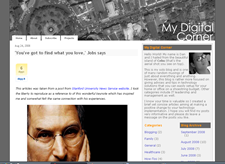
  • The "Thumbs-up": Since I'm a registered member of StumbleUpon, I clicked on "thumbs-up" recommendation on my own posting and forgot about it since most of my own StumbleUpon recommendations didn't help in the past anyway.


analytics_2

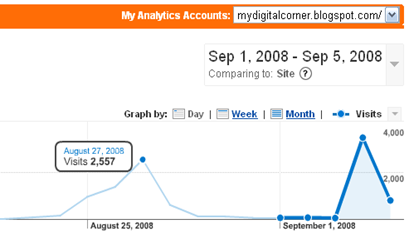
  • The Traffic: Immediately after that, traffic increased quite consistently until after 24 hours it hit 1,103 viewers. The following day, it still continued to increase and reached 2,461 visitors and finally on the third day a whopping 5,018 visitors! I know this may not be much from professional bloggers but it is to me specially since I'm quite a newbie on this thing.


analytics_3

analytics_4

  • The Surprise: What is even more surprising to me was, a week after it's first peak, visitor traffic peaked again but this time the traffic was even better than the first. So, it wasn't just a one time thing after all.
analytics_1


Observation: What went right?

  • The Post: The post's title was "Do what you love doing. - Jobs says". It's a very inspiring speech delivered by Mr. Steve Jobs about his life's challenges and successes.
  • The Category: I tagged or categorized this post under Lifehacks. Take note, I has another original post under this category that also made significant traffic.
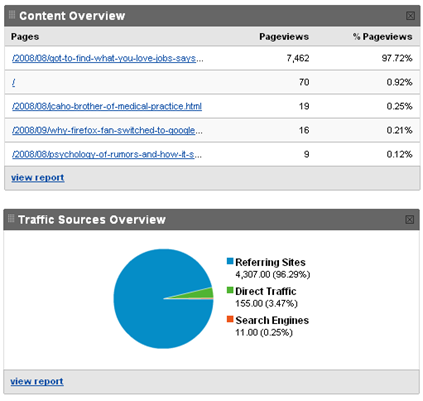
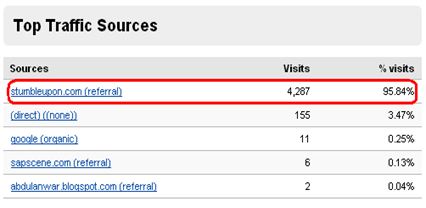
  • The Source: Among all social media sites that I joined in, only StumbleUpon has referred a significant number (93% to be exact) of people to my blog and majority of which came from the United States.
  • The Recurrence: This totally caught me by surprise but the recurrence of increased traffic was due to my accidental mistake on resubmitting the same post after the first peak has subsided six days after.

Lessons Learned: My Analysis

  • Search engines don't help. So don't bother submitting your site map to major search engines because they only bring in 1% to 2% of your total site traffic.
  • People like to be inspired. Inspiration spans nationality, race, age, gender and even time. Blog postings that make people inspire will surely be a hit and it is never seasonal. If you want to appeal to a greater mass, then inspire them often.
  • Focus on the 'Stumblers' and drop the rest. Focus only on things that matter to you and forget everything else. If it's traffic you want, then just use and be involved in your network of StumbleUpon users. If you don't have one, register. I guarantee it works, at least for me.

Stumble Upon Toolbar

Sep 4, 2008

Why a Firefox fan switched to Google Chrome?

chrome2sep2008

I just downloaded the new browser from Google called  Chrome and the very first thing I noticed was it's amazingly fast page rendering capabilities and significantly low memory usage. Something I had been complaining about on Firefox.

I have no accurate benchmarks to show and compare with other browsers but on a user's point of view, here is what I have to say:

1. Incredibly fast.

We're using a lot of Google's products and services in our daily office tasks particularly Google Apps. Google Apps leverages on AJAX to improve its usability features of its products, when using a regular and traditional browser, it takes some time to load everything. With Google Chrome, everything almost instantly appeared in a snap!

2. Low memory usage.

I normally open up and use 8 to 10 tabs all at the same and, you guessed it, sooner or later my browser just hang-up on me. When I hit CTRL-ALT-DEL to check, it has hit as high as 210 MB! Just for a browser. Memory leaks on Firefox is very notorious.

With  Chrome, all tabs runs on a separate process and memory usage is significantly lower that any browser I know and used.

3. User Interface Design

I admit, it's not as pretty as IE or Firefox but it gives me all the viewing space I need without the unnecessary clutter. This was intentionally designed this way so users can get to focus more on the content rather than buttons you see on a browser's toolbar.

4. Security

Well there is no real way to test this feature initially but according to their product specs, everything in Chrome is 'sandboxed' so no rogue or malicious programs can write on your disk or spy on what you type on your keyboard. I'd say, this security design is unique and very well thought of.

5. Application shortcuts

Even with the absence of my favorite extensions and plug-ins, suffice to say I am contented with the Application Shortcut feature of Chrome. It creates a shortcuts of my favorite sites as if it were a real application. I made a few shortcuts for my Google Mail, Google Reader, and Google Docs.

Chrome will has huge, huge potential in the browser market and it will create a massive followers soon after it has its developers develops plug-ins and extension for it. Why another browser? That I will write about on my next post.

Oh yes, I have now switched to Google Chrome.

Stumble Upon Toolbar

Aug 29, 2008

Warren Buffett’s 7 Secrets for Living a Happy and Simple Life.

buffett1

Warren Edward Buffett (born August 30, 1930, in Omaha, Nebraska) is an American investor, businessman and philanthropist. He is regarded as one of the world's greatest investors and is the largest shareholder and CEO of Berkshire Hathaway. With an estimated net worth of around US$62 billion, he was ranked by Forbes as the richest person in the world as of February 11, 2008. --Wikipedia


Secret #1: Happiness comes from within.

“In my adult business life I have never had to make a choice of trading between professional and personal. I tap-dance to work, and when I get there it’s tremendous fun.” -- Warren Buffett


My thoughts: Computers and writing software has always been my passion since the first Apple desktop was released. I left this passion for several years but can't seem to forget about and something keeps drawing me back to it. I then decided to drop from med school and started re-learning and write software. I followed my heart's desires despite all odds and now, I work as Chief Technology Officer and enjoying every single day of it. 

Secret #2: Find happiness in simple pleasures.

“I have simple pleasures. I play bridge online for 12 hours a week.” -- Warren Buffett


My thoughts: Yes. Life's greatest happiness come from the simplest of things. It's easy to be distracted from false pleasures in the age of commercialism all the while, true pleasures are eagerly waiting for me back home.

Secret #3: Live a simple life.

“I just naturally want to do things that make sense. In my personal life too, I don’t care what other rich people are doing. I don’t want a 405 foot boat just because someone else has a 400 foot boat.” -- Warren Buffett


My thoughts: Many people I know mistook 'simplicity' to being an underachiever. Simplicity is focusing on things that are essential, staying pure and being humble. For me, the essentials are keeping my kids to school until they finish college while aspiring to get a modest home that we can call our own and save-up for retirement. I guess, anything more that that is just for show-off.


Secret #4: Think Simply.

“I want to be able to explain my mistakes. This means I do only the things I completely understand.” -- Warren Buffett


My thoughts: Clarity comes from genuine understanding of ones self. If that's done, only then one can tread a life of meaning and purpose. With this, I will worry about things that concerns me now while still directed towards the future. This also means that I shall have only pure thoughts and not be tainted by complexities and negative ideas.

Secret #5: Invest Simply.

“The best way to own common stocks is through an index fund.” -- Warren Buffett


My thoughts: Okay, I am not an investor and I don't even know what index fund means until I googled it. I think the idea here is to save wisely and not putting all one's entire savings in a single basket. Stay away from 'get rich quick' schemes or any forms of investments that is too good to be true.

Secret #6: Have a mentor in life.

“I was lucky to have the right heroes. Tell me who your heroes are and I’ll tell you how you’ll turn out to be. The qualities of the one you admire are the traits that you, with a little practice, can make your own, and that, if practiced, will become habit-forming.” -- Warren Buffett


My thoughts: "As the twig is bent, so the tree is inclined" or "The child is the father of a man". Our life's direction is molded early on by our parents, teachers, and heroes. Let's learn the good qualities, leave behind the bad ones and be the best we can be.

Secret #7: Making money isn’t the backbone of your guiding purpose; making money is the by-product of your guiding purpose.

“If you’re doing something you love, you’re more likely to put your all into it, and that generally equates to making money.” -- Warren Buffett


My thoughts: Remember the movie "The Field of Dreams" and the very popular phrase - "Build it and they will come"? Yes, just follow your heart's desire and wealth will come as a side-effect.

** This article was inspired from a post made on SuccessSoul.com and added my own personal thoughts and opinions on them. Please take time also to visit that very wonderful site as well.

Stumble Upon Toolbar

Aug 23, 2008

10 Essential Tools for Bloggers

chips472

There are multitudes of user tools and utilities you can add to your site as a blogger but I made a short list of essentials that you, as a blogger wouldn't go without. This is particularly helpful for beginning / professional writers who are just getting into social media and quickly get started.

  1. Blogger Platform : This serves as a writer's canvass or repository of all things you write. There are several blog platforms you can use such as: Blogger and WordPress are two popular platforms you can start. I suggest using Google Blogger because its easy and flexible to use. I use Blogger for this blog with custom template.

  2. Offline Blog Writers: You can't be too dependent on Internet just to make your blog entry. You can create your blog offline and publish them as soon as your online. This way, you can blog anywhere you want. If you have a Google account, you can make use of Google Docs offline document management to write and publish your blog or, you can download Microsoft's Windows Live Writer. This free product from Microsoft is fantastic!

  3. Image Editors: A good blog should always have images and images attract and says a lot about your post. Now, we will be doing with away with softwares you can install and buy. I would recommend using the online image editors so you can edit images anywhere without having to install them in every PC just to use them. A good and simple online image editors are Photoflexer, Picnik and for a little more advanced users- SplashUp will do the job.

  4. Content Distribution: It's not enough that your blog just sits in your webhost and waits for someone to hopefully read them. To reach a broader audience and eventually followers, one must use a content distribution services to to deliver your content to different aggregators or through emails. I can only recommend one of such service and that is FeedBurner.

  5. Analytics: To know just how many people visit your blog, the posts visitors are reading, and other measures to determine its effectivity, Google's Web Analytics provides a complete and detailed analytics report about your blog site. This aids you as a publisher to identify which areas on your site that need working on.

  6. Advertising: Not many would go in this direction of monetizing their blogs. Some find it too commercial and just provides too many distractions to readers. Just in case you would want to try your hand on making a decent earnings then you can try your hand on Google's AdSense. Other advertisers includes Microsoft, Yahoo and Widget Bucks.

  7. Blog Promotion Tools: Besides just writing a good blog, you must also promote it to increase your sites readership. You can sign in with the likes of: Del.icio.us bookmarking, StumbleUpon, Digg and other social markers to gain awareness.

  8. Image Sources: To make things simple on looking for images, I usually use Google's Image Search Engine to find the image I want. There are quality photos you can find on Flikr and other commercially sold stock photos.

  9. Research Tools: Nothing is more important than finding a good and timely information for your blog. As a somewhat beginning blogger myself, I subscribe to other news and aggregate them using an RSS aggregators like Google Reader or BlogRovr. If your following on a certain product of a specific company, the bast way to do this is use Google Alerts. For statistical data, check the Google Trends. Other useful tools also include dictionaries, encyclopedias and a thesauri.

  10. Copyright License: Lastly, you have to protect your work from malicious individuals from copying your original work or getting sued by someone just by quoting their words. Check Creative Commons and learn more about it.

These are just the right tools to get you started. Please note that these only aids you in the process of making your blog and initial promotion. This will surely not guarantee you success in monetizing or increasing your traffic.


Stumble Upon Toolbar

Jul 18, 2008

10 Reasons Why You Should Move to Cloud Computing.


1. High Availability: A 24x7x365 Operation.


Most 'cloud' data centers are designed to be highly redundant. This means that your data are 'mirrored' across several servers that are spread out on different locations. Such setup ensures that when one of the server or data center that host your data goes down, it can still be available on another server without noticing any significant downtime. Besides the basic infrastructure, it is also supported by a promise or guarantee to all its subscribers to maintain a 99.99% uptime. This guarantee is called Service Level Agreement (SLA).


2. Has Enormous Computing Resource

Cloud service providers have invested millions on bleeding-edge technologies such as computer servers and networking equipments. These hardware has tremendous computing power and speed that is dynamically allocated when your computing requirements suddenly peaks.


3. No Expensive Computers Required to Purchase.

Since cloud computing are network-based services and resides on remote hosts, no special hardware purchases are required besides a basic internet connection. This alone is a huge cost savings to subscribers.


4. No Maintenance Needed.

Data centers of cloud service providers are well-manned by highly skilled engineers to do maintenance work. They operate 24x7 and are always on a stand-by mode in case something critical happens. It is just like having a team of engineers in your work place to manage your data!


5. Portable

You can bring your work with you anywhere you go where internet connection is available. More and more people nowadays telecommute and do their business online without leaving the confines of their own homes – fascinating isn't it?


6. Very Scalable

This is one feature is a big welcome among SMEs. Service features and pricing scales up as your business grow thereby, paying only what you need instead of paying for a features that you seldom use.


7. High Quality Software Suite

Software applications that form part of computing service are always made with extremely high quality. These software are continually developed and maintained by an army of software engineers only to give you the best possible user experience.


8. No or Little IT Staff Needed

Cloud computing is a complete, all-in package IT service and that includes sparing you from hiring several IT engineers and programmers to maintain or develop in- house systems for you.


9. Well Supported

A 24x7 helpdesk support is available for you to ask assistance from at no extra cost.


10. It's Either Free or Very Affordable

There are many free services out there that you can take advantage to increase your company productivity and web presence. One free SaaS that has proven its reliability is Google Apps – a web-based collaboration platform that manages emails, calendar, and other office productivity suites.

Stumble Upon Toolbar

Jul 6, 2008

Software-as-a-Sevice : Opportunities and Challenges


Service Oriented Architecture (SOA) or Software-as-a-Service(SaaS) as it's popularly called now, has been around since the early nineties presumably to deliver software services over the internet. Beginning on the first quarter of 2007, it has steadily increased popularity and acceptability across different business spectrum – from manufacturing, healthcare, and even banking industry.


What is SaaS?

SaaS is a remotely hosted computer programs (applications) provided to customers/subscribers across the internet. These applications range from a wide variety of purpose, from Customer Relationships Management(CRM), Content Management Software (CMS), Enterprise Resource Planning (ERP) to Electronic Health Record.


Common SaaS Infrastructure.

Besides just the software, it also carry an impressive support infrastructure as an added value service.


    • Scalable and redundant 24x7x365 data centers

    • Call center support

    • Security and security management

    • Service Level Agreement (SLA) Guarantee

    • Sufficient network and bandwidth capacities

    • Performance and availability commitments

    • Disaster Recovery Procedures


SaaS Opportunities: the business bottomlines.

Adopting the SaaS initiative takes your business on a level with huge enterprise as to management and service tooling. The bottomlines are as follows:


1. Either free or low-cost.

There are many SaaS offerings that are either free or has scalable payment scheme meaning, you only pay as you use them on a fixed term - usually on an annual. The features you get also increases as your business grows.


2. No required maintenance. In house IT not required.

In a traditional setup, an IT staff is required to maintain the software purchased. Maintenance may be in the form of security patches, upgrades, and bug-fixes. In a SaaS setup, all hardware and software maintenance are completely managed by the SaaS provider, thus freeing your business from additional unwanted costs.


3. High availability of service – mostly guarantees 99.99% uptime.

SaaS providers spent billions of dollars building advanced data centers that are spread across the globe to provide high redundancy and reliability on the services.

These data centers is where they host SaaS and guarantees 99.99% uptime. This means they guarantee 24x7x365 availability of your application.


4. High quality of software service.

Almost all SaaS come in a very rich and complete features.


5. Freedom of Choice

There are literally thousands of SaaS offerings on the internet and you are free to choose the service that is right for you. On the other hand, you can also move your existing SaaS to another whenever you wish. Most SaaS providers provide a free migration tool so you can easily switch your data from one service to another.


6. Focus on core competency.

Since much of the work implementing SaaS are at the hands of the provider, your business can now save on resources (manpower and financial) and focus more on core competencies.


SaaS Challenges:


1. Security

Since corporate data will be hosted offsite, and despite saas guarantee on privacy; many are still very skeptical on adopting it. My personal point of view is, SaaS providers are very good on what they do and that, they can secure and provide better services on managing your data than we do – period.


2. Offline Connectivity

Another front where SaaS is trying to prove itself is its offline connectivity to remote services. Not all SaaS providers can let you connect to your subscribed services offline. Google is leading the pack on offline connectivity with its Google Gears project. Google Docs, Spreadsheets and News Reader are some of its applications that can be managed offline.


3. Speed

Speed is somewhat subjective and relative from the end-users point of view. In many developed countries like the U.S., access to these SaaS are never really an issue. If you live in a country where internet connection is somewhat slow or flaky, this can pose a serious problem when considering to choose SaaS.


SaaS Starting Point

The starting point may again vary from one company to another. It depends on which 'in-house' applications that's taking too much of your company's resources that you wish to address first. If you manage a small or medium size business, a school or any form of organization; the best place to start is Google Apps (GA). It's a free SaaS that boasts tremendous usability and reliability features. You can also try using Salesforce CRM for your sales team as well.


Google Apps can also be extended through it's Google Apps Engine so you can take advantage of the current collaboration features and its enormous 'cloud' computing resources.


Conclusion

SaaS clearly provides more opportunities and far outweighs its temporary limitations. The trend in computing now is inevitably towards that direction and any business will surely benefit from its cost-effective solution than the traditional practice of hosting and maintaining in-house applications.


Stumble Upon Toolbar

Jul 3, 2008

Hiring People: Choosing between skills and attitude.

Hiring the right IT worker is one of the most critical job an IT manager faces on a regular basis. In most cases, we look into the candidate's skill sets first to see if it fits our requirements, followed by work experience and lastly, the character or attitude. When I started out as a new IT manager, I obviously wanted to hire the best people so, I dug deep and looked very closely into their skills and work experience. The more skillful and experienced a candidate become, the more likely he gets hired. Attitude is often times overlooked.

This method of qualifying a candidate has been a wide practice among many companies (mine included) over a long period and noticeably, it coincided with my also long unsuccessful stint of selecting a potential candidate. After several years of interviewing a vast mix of candidates and hiring experience, I finally came up with a conclusion that there are only two types of candidates: 1) Candidates that have skills and 2) Candidates that have the right attitude.


Candidates that have skills - These come in moderate abundance and competition is very rigid. They are usually the more confident types and more expensive ones as well. They are very employable and understandably so, you would most likely hire them on your team. We tend think that these are the people that can get the job done every time .

Candidates that have attitude
– These come very few and often times overlooked by many employers. These candidates have somewhat 'weak' skills but have the right attitude towards work. They are dedicated, humble, excited and very willing to learn new things.


As a CTO, I have always hired countless candidates with high skills and experience so I can comfortably fall back to my usual task and let the new guy handle the job. Despite the high pay and benefits, I always end up losing them due to varied attitude problems. Luckily for me, I had the opportunity to experiment on hiring the second type of candidate – the ones with attitude.


The second type of candidate takes me out of my comfort zone to train and nurture . They are always willing to accept new challenges and finds fun in solving them. Learning is their way of life and are always excited to learn new things. This type of individual struck me at first for I haven't had that type of staff before – very enthusiastic, personable and certainly dedicated. This candidate will surely go along way.

In conclusion, skills are short-term and can easily fade in time. No one gets remembered for long on skills alone but attitude does. Skill is something that can be trained, learned and developed. Attitude isn't. Attitude on the other hand is molded by an individual's social experiences and outlook. Attitude has more value that a ton of gold. So when hiring a new set of people, dare to look and hire the second candidate. You will be surely amazed at what he can do for you can for your
company.

Stumble Upon Toolbar

Jul 2, 2008

Better by Design - A User Interface Heuristics

Here are some simple rule-of-thumb when designing user interfaces for your projects. Try to adhere to this simple yet practical approach and make it work for you to make your project a success!

  1. Usefulness:
    • Upon developing a product, the specifications must be almost entirely centered around what people need and not what you think is hip or advanced. The focus should be on people's needs and what makes them more productive and well-informed once they start using your product.
  2. Fast:
    • Nothing is more valuable to anyone than the end-user's time. It should get to their destination fast. This means cutting down on load times and page clicks whenever possible. Every millisecond counts so cut all the unwanted 'fat' out!
  3. Simple:
    • "True refinement seeks simplicity" -Bruce Lee. Things of beauty always come from simple things. Use natural colors and simple components so it can be readily accepted by end-users. Proper selection of icons and images are included as well. Use minimalist approach whenever possible.
  1. Clean/Organized:
    • Avoid information clutter. Display only information that are most used. Tuck away those that aren't. Provide an easy way where users can easily find what they are looking for.
  1. Personable:
    • Allow customization. Create an environment where users can be comfortable on the choices of information and features they want. Personalization must be limited and must not get in the way of the principles of simplicity.
  1. Consistent:
    • Design and layout must be uniform all throughout the application that will make user increasingly familiar as they use the application.
  2. Unique:
    • Make a design that is identifiable to you. An interface design that reflects the type and culture of end-users. This creates your brand uniquely identifiable among other applications in the market.

Stumble Upon Toolbar

Jun 22, 2008

OpenDNS – For Network Security and Speed!


As my efforts continue to focus more on our Company's strengths by moving our IT services externally, I have unearth another service that will help streamline system administration tasks – thanks to OpenDNS.

One, sometimes annoying, tasks a System Administrator handles on a daily basis is to monitor network and internet activity. Primary reason is to manage users from visiting sites that may cause network congestion, expose security risks and decrease worker productivity. Despite the existing policies that are in place, this activity takes a significant amount of time from the system administrator.

OpenDNS is a another reliable and free DNS service that will definitely takeaway unnecessary workload from your system administrator to focus more on another important tasks.

OpenDNS boasts the following features to help speedup and secure your internet connectivity:

  • Content Filtering,
  • Phishing Protection,
  • Domain Blocking,
  • Adult Site Blocking,
  • Web Proxy Blocking,
  • and Domain Whitelisting

Setup is very easy for fixed or dynamic IP users. All it takes is to sign-up and configure your PC or router to point to their DNS servers and voila! You're all setup and just forget about it. You may optionally customize your filter to additionally block unwanted sites say, mail.yahoo.com.

Stumble Upon Toolbar

Jun 9, 2008

The best FREE alternative to MS Office Suite


IBM's Lotus Symphony -

the best FREE alternative to MS Office Suite.


I found a really, really, really wonderful office application that really makes me feel comfortable working and very excited to tell everyone! It's IBM's variant of OpenOffice Suite called Lotus Symphony.


Lotus Symphony was based on OpenOffice infrastructure but has much more of a homey feel like MS Office. It's well designed interface makes it easy for beginners or long-time MS Office users to make the switch.


The wonderful key features of Lotus Symphony are as follows:


  • Well organized interface design. All document types open up in a single window as tabs. Much like how Firefox browser opens new pages in a tab. All documents have a single uniform tools bar and some properties of objects may be manipulated from its sidebar located on the right window.


  • Windows formats are supported. Just like its predecessor, Symphony can open any MS Office document formats may it be spreadsheet, document, or presentation. It's default format for saving document is ODT or open document format.


  • Lightweight. It has small installable file and open really fast. Also utilizes small amount of memory unlike its predecessor.


I would say that this app will surely be an MS Office killer! I made the switch and moving my entire company's office suite to this one.


Stumble Upon Toolbar